Research
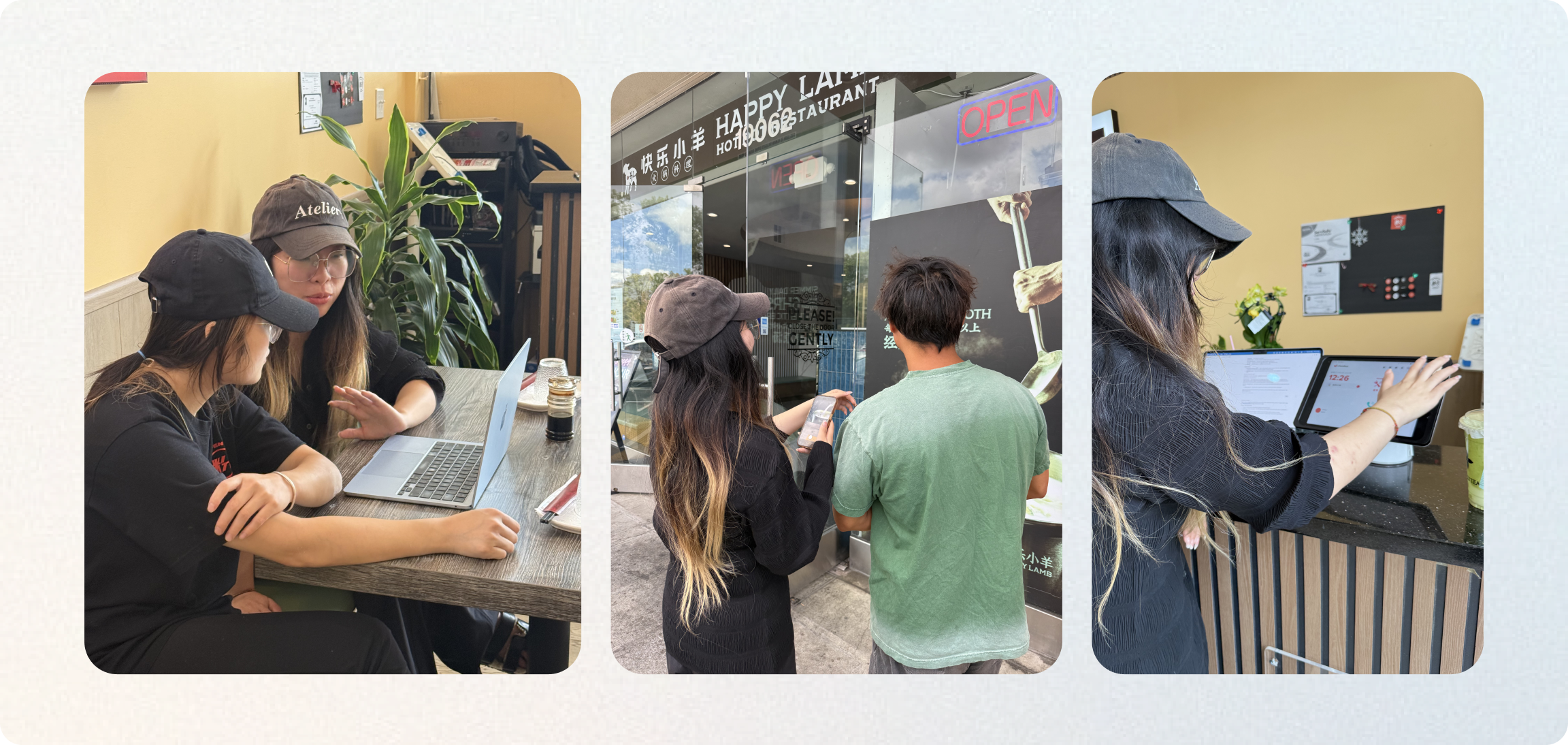
To understand how users should experience Brand Kit and the broader GenAI journey, and how the AI agent could build on that experience, I conducted both user research and model research. Interviews and journey mapping showed me how users started and where they needed support; prompt testing and a review of the existing flow revealed where the system could be helpful or misleading. The intensive research gave me a clearer basis: Brand Kit had to work with uneven input while keeping users involved in shaping its interpretation.
01 — Different types of users have different inputs and ideas about their brands.
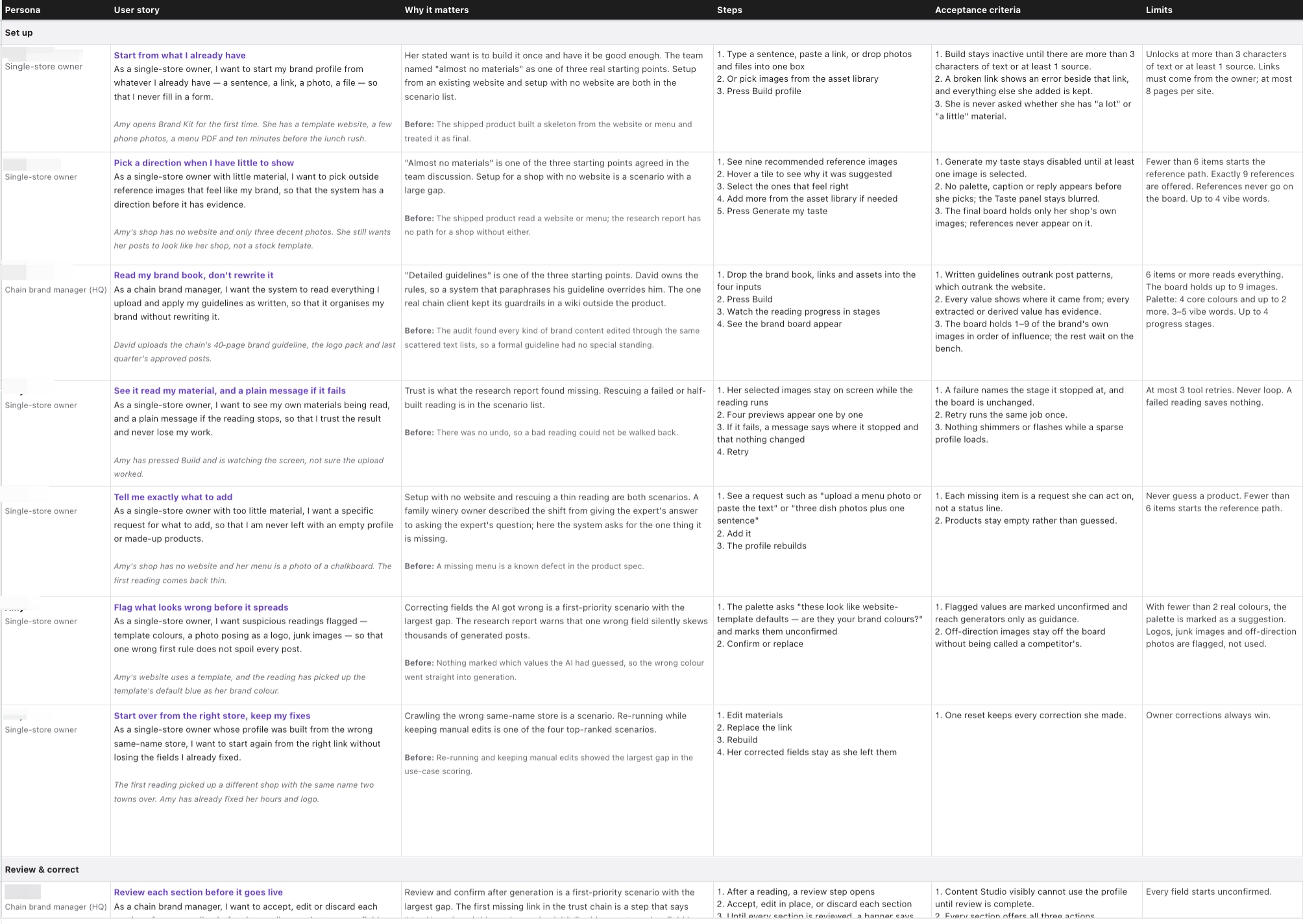
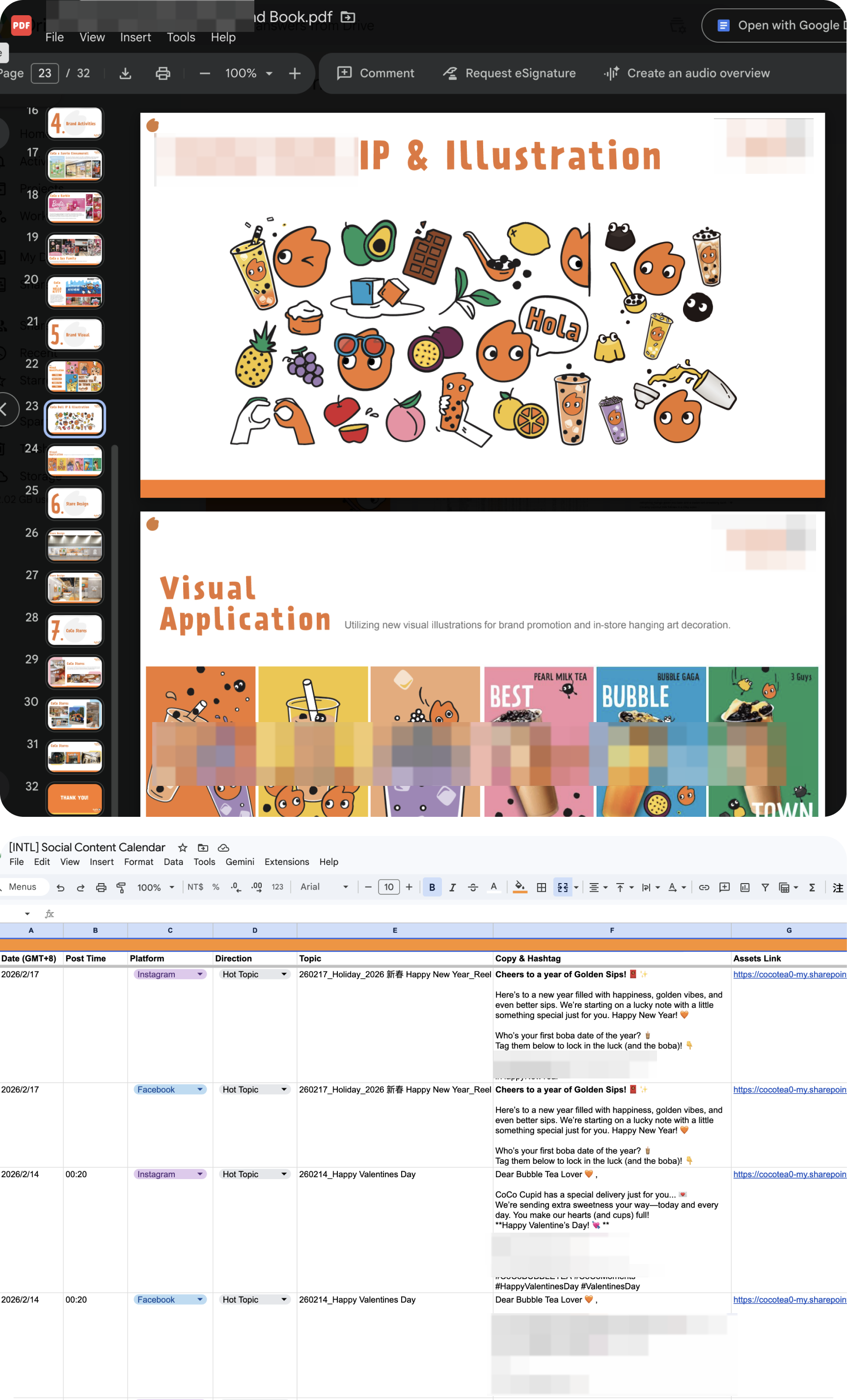
Through user interviews, I found that some of our users were still discovering how to describe their brand; others arrived with extensive material and needed to decide what mattered. I mapped both ends of that range to see how one experience could guide users without forcing them through the same steps.
02 — AI agents need specific directions and references, but users don’t know what to give
Model and prompt testing showed that limited material could lead to unsupported brand facts, while large amounts of material made brand consistency harder to achieve. A word that felt clear to a user could still leave the model room to go off course. Testing also showed that image references guided image generation better than text-only descriptions, with six to nine images working best as a reference set. These findings gave me two concrete requirements: make it easier for users to supply visual references, and keep those references focused enough to guide generation.
Models under test

Read
Turn a website or images into a brand spec

GPT-4o mini vs GPT-4o
Website to brand profile

GPT-4o mini vision
Reference images to style spec

Generate
The outputs under test

GPT-4o mini
Captions, tone, review replies

gpt-image-1
Brand images, seed-paired

GPT Image 2 · Nano Banana 2 · Seedream 5 Pro
Production models the prompts map to; not scored here

Judge
Did the output follow the rule?

GPT-4o
Text judge, temperature 0

GPT-4o vision
Image judge

Code checks
Counts, word lists, color distance
Brand extraction
GPT-4o mini and GPT-4o · 4 prompt versions
Captions, tone and replies
GPT-4o mini, judged by GPT-4o · 4,179 outputs
Images
gpt-image-1, judged by GPT-4o vision · 597 images
By amount · random on-brand images


 0.250.45
 0.590.56
By mix · nine images
0.660.440.350.35Reading visuals is easier
Control contribution
03 — Users need to automate the loop of evolving and updating the brand
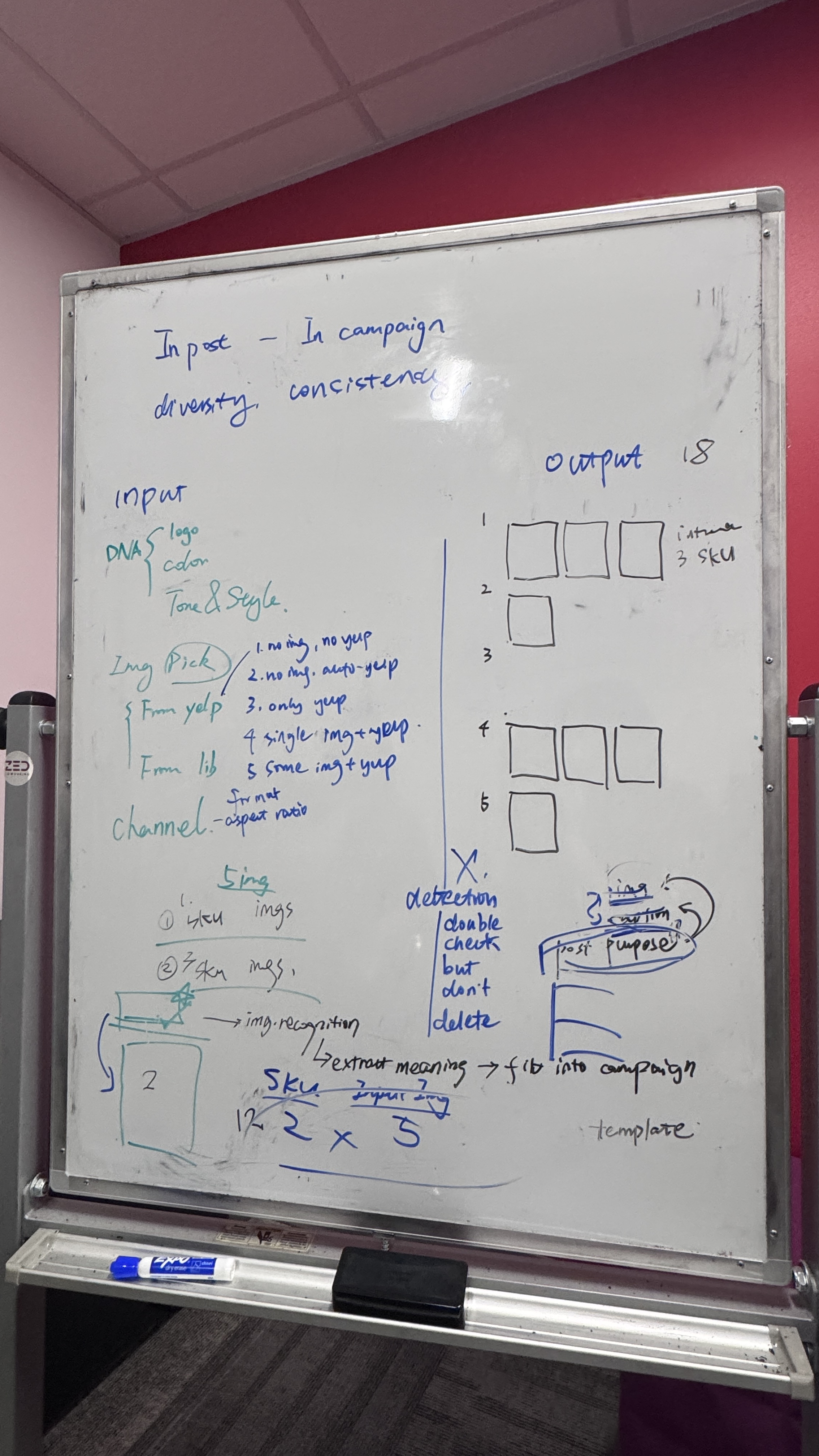
Working with the marketing team and founders, we mapped out the user journey and discussed how to create a complete Brand Kit loop for our end users, from both UX and implementation perspectives. To keep all AI-generated content on track, the next challenge was to keep brand guidance consistent while making the reach of each change clear to users.
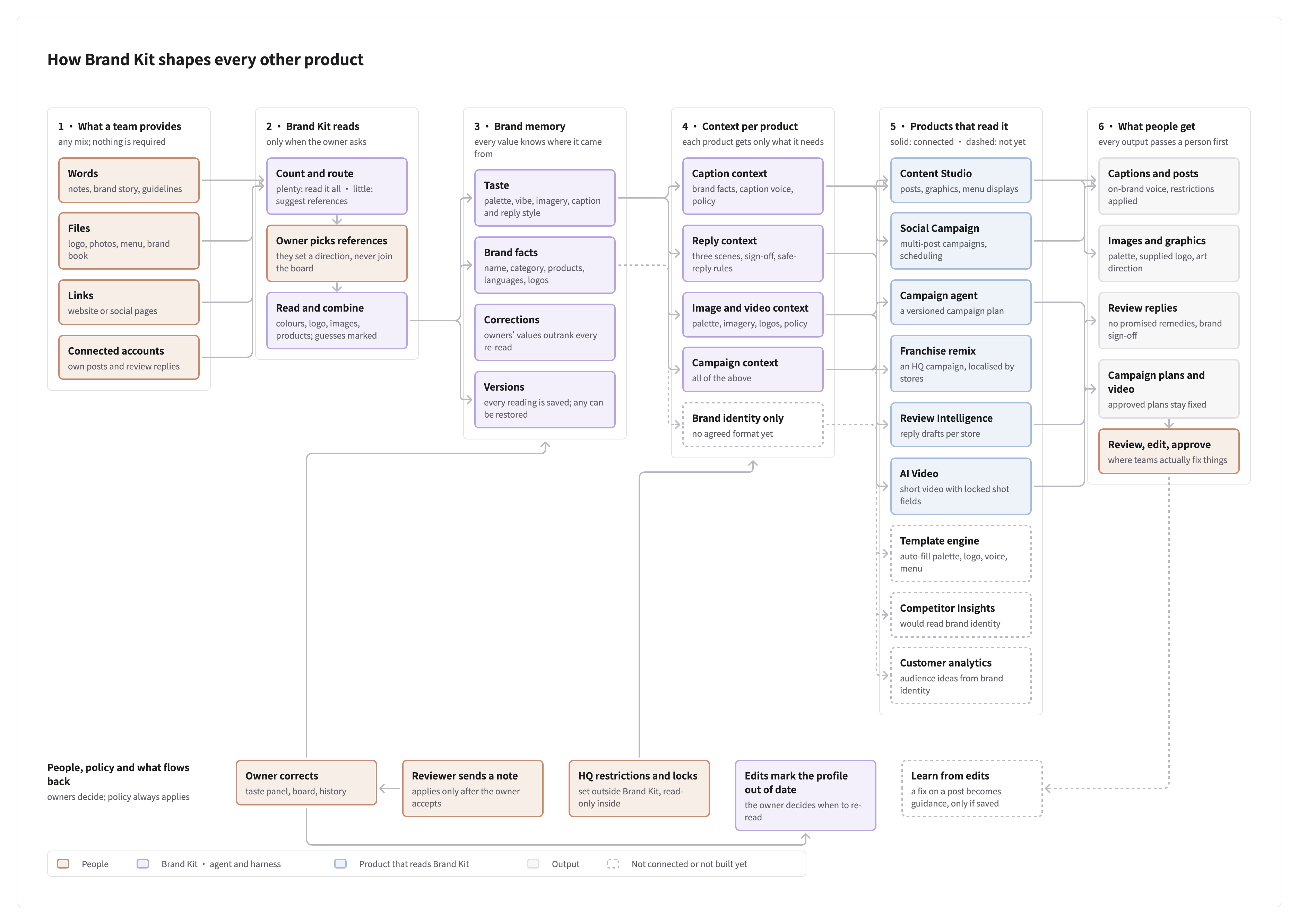
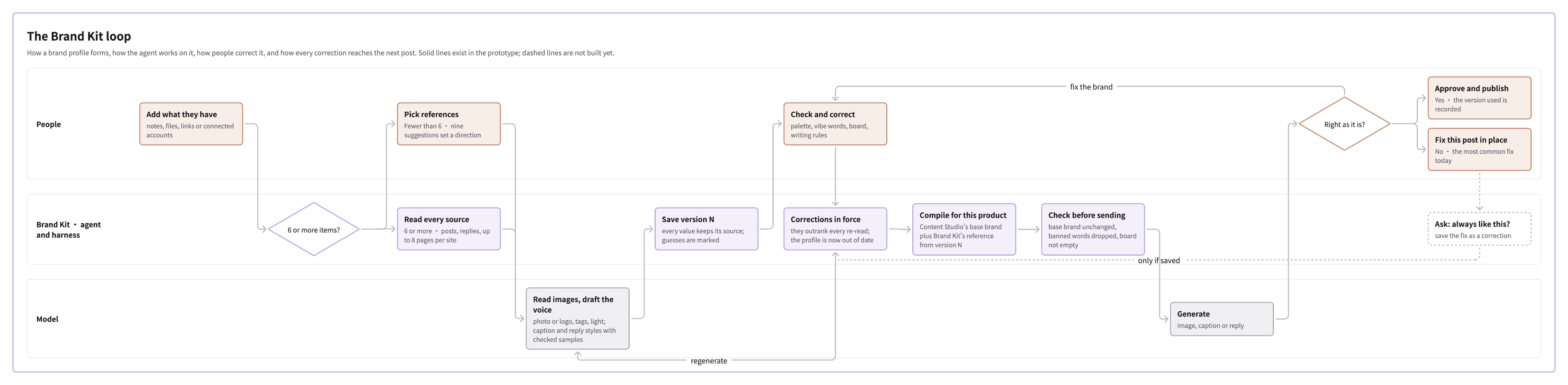
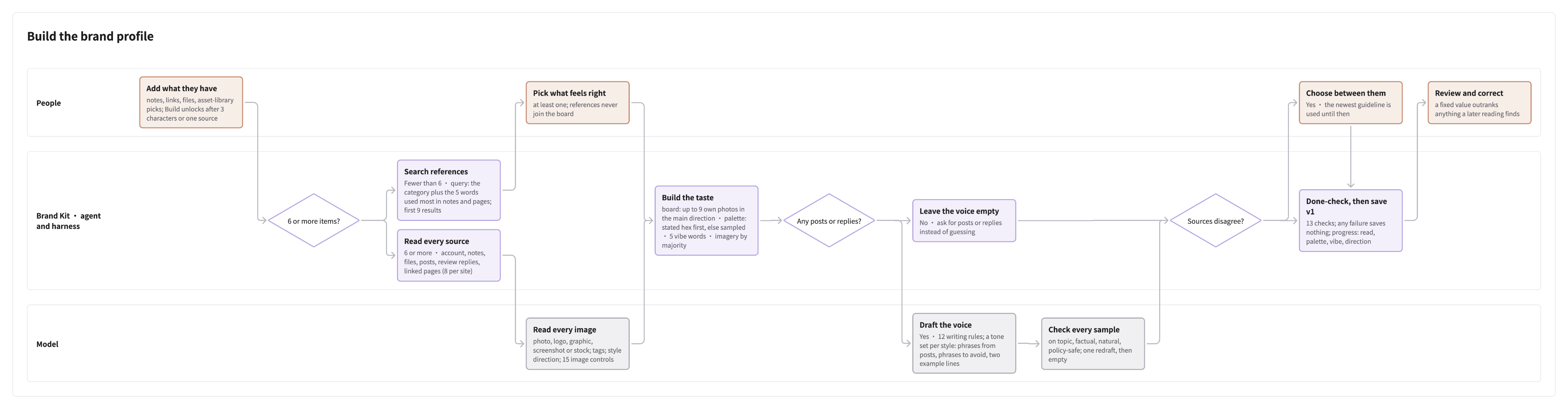
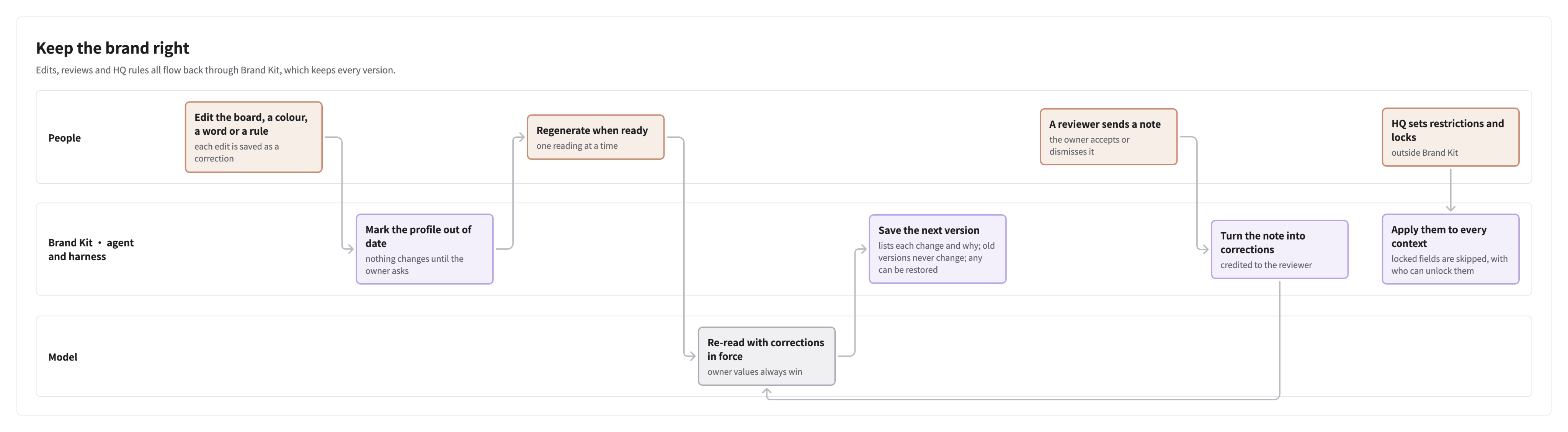
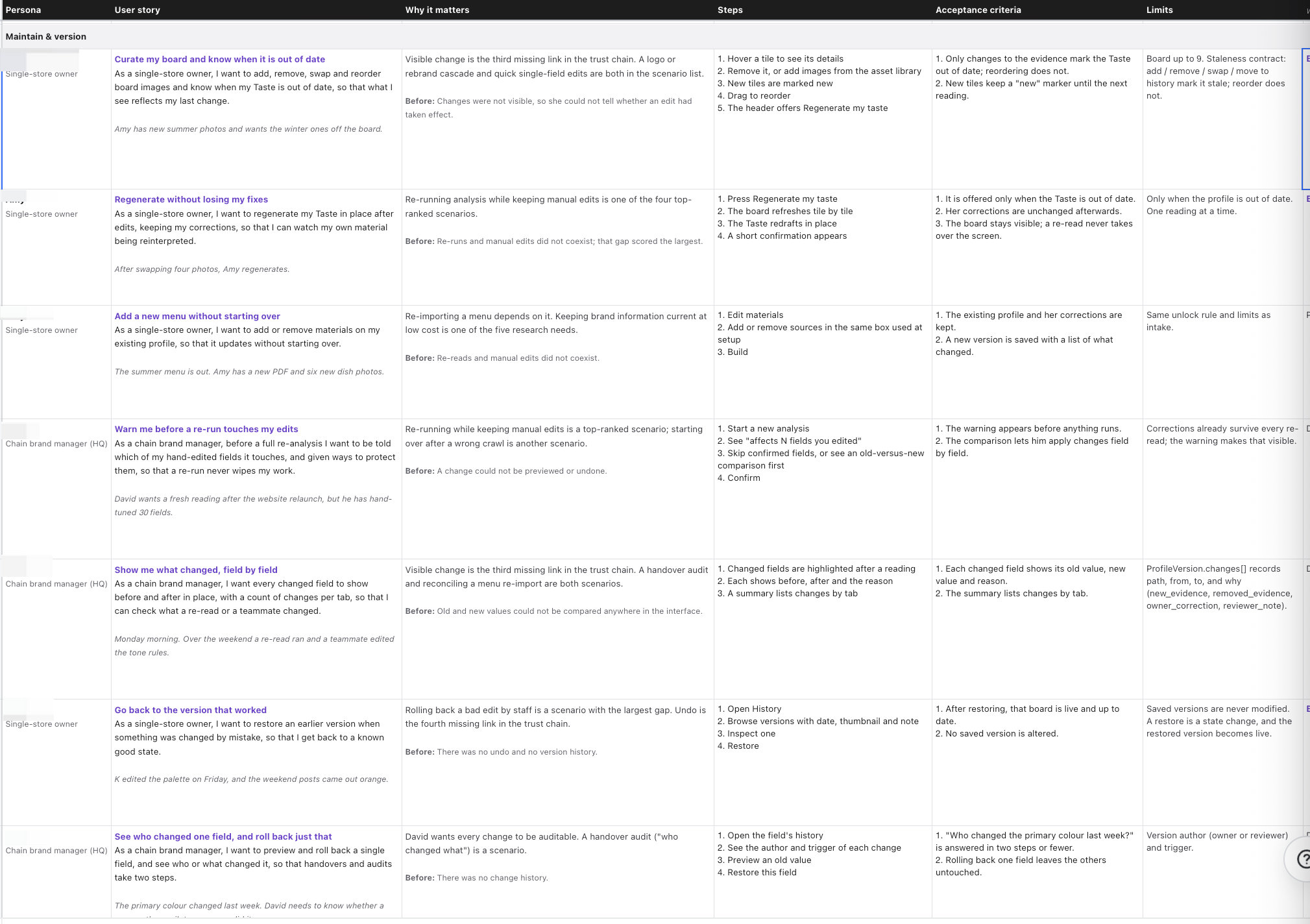
Agentic Design Ideation
By learning about context and model capabilities, I defined the main design challenge: Brand Kit needed to do more behind the scenes without asking users to trust decisions they could not inspect. A higher level of automation means a better user experience with Brand Kit. Learning from both users and model capabilities, I began exploring how users interact with the interface and how to make the harness foundation trustworthy.
01 — Build the harness so agents guide the content creation process precisely
Drawing on user research, model testing, and the mapped user journey, I wrote brand-kit-agent.md—a behavior specification for the Brand Kit agent. It defines the harness rules for how Brand Kit processes customer inputs, prepares instructions for generation, and updates the brand profile. These rules made the intended behavior explicit and provided a basis for test cases.
- Role of the agent
- The Brand Kit agent writes profile versions and supplies context. Owners edit and accept changes; reviewers approve or request changes. Generators read context without updating the profile.
- Scope
- Read brand materials, posts, reviews and photo choices to maintain the profile and prepare creation guidance. Content generation and publishing stay with creation tools.
- Constraints
- Turn caption and reply styles into explicit writing rules, and photo readings into visual plans. Preserve product facts and supplied logos, and respect HQ restrictions.
- Entry points
- Route onboarding, material updates, Taste regeneration and accepted feedback to the right rules. Supply context on request; learn after ten new published posts, replies or photo choices.
- Core rules
- Prioritize HQ-locked values and owner corrections, select brand photos for the board, and derive palette, visual direction, caption and reply styles. Save changes as new profile versions.
- Memory
- Keep profile versions, the working board, corrections, source evidence, reviewer requests and event history so brand learning remains traceable.
- Output format
- Return a reviewable brand profile or task-specific context for captions, replies, images, video and campaigns, with explicit gaps, skipped sources, owner decisions and error states.
- Definition of done
- Check evidence-backed brand facts, board and Taste rules, active corrections and sample quality before saving a version. Validate each creation tool’s context before returning it.
- Failure modes
- Retry failed tools, skip unreadable brand files or links, and flag missing products or logos. Stop without saving when processing or validation fails.
- Human escalation
- Surface conflicting brand guidelines and reviewer requests that cannot map to a brand or Taste field. Give owners the alternatives and flag low-confidence values.
02 — Rapid testing informed a visual-first moodboard and an intuitive input flow
Across several rounds of rapid user testing on prototypes I built with AI tools, we found that users needed a faster way to judge brand direction than reading a text-heavy profile. Model testing added two findings: image references guided image generation better than text-only descriptions, and six to nine images worked best as a reference set.
These findings informed the agent’s board rules: select up to nine brand photos within one visual direction, keep additional photos outside the active board, and use the board to guide visual interpretation. Written brand restrictions and explicit user corrections retain priority, so the moodboard supports generation without overriding the rest of the brand profile.

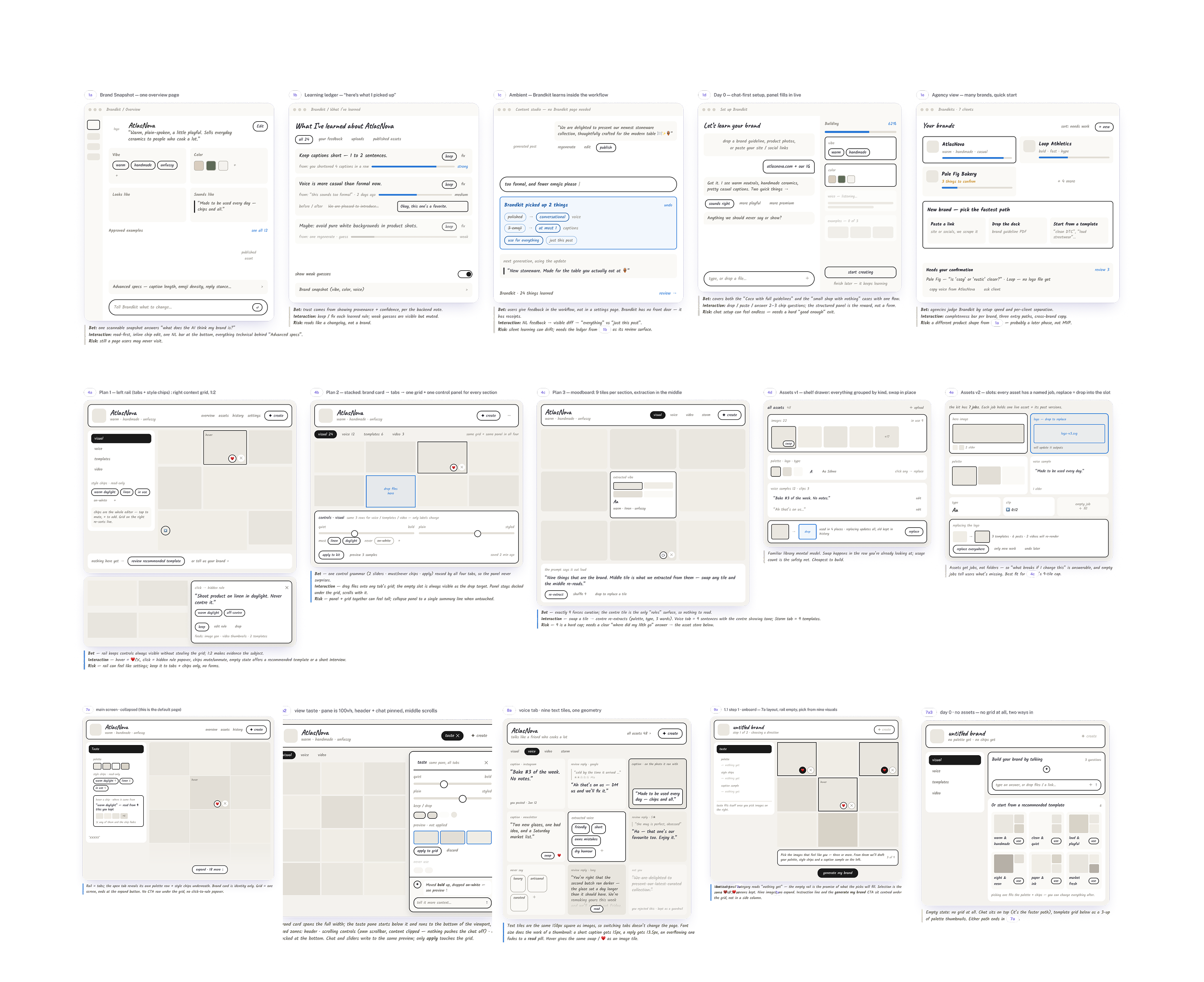
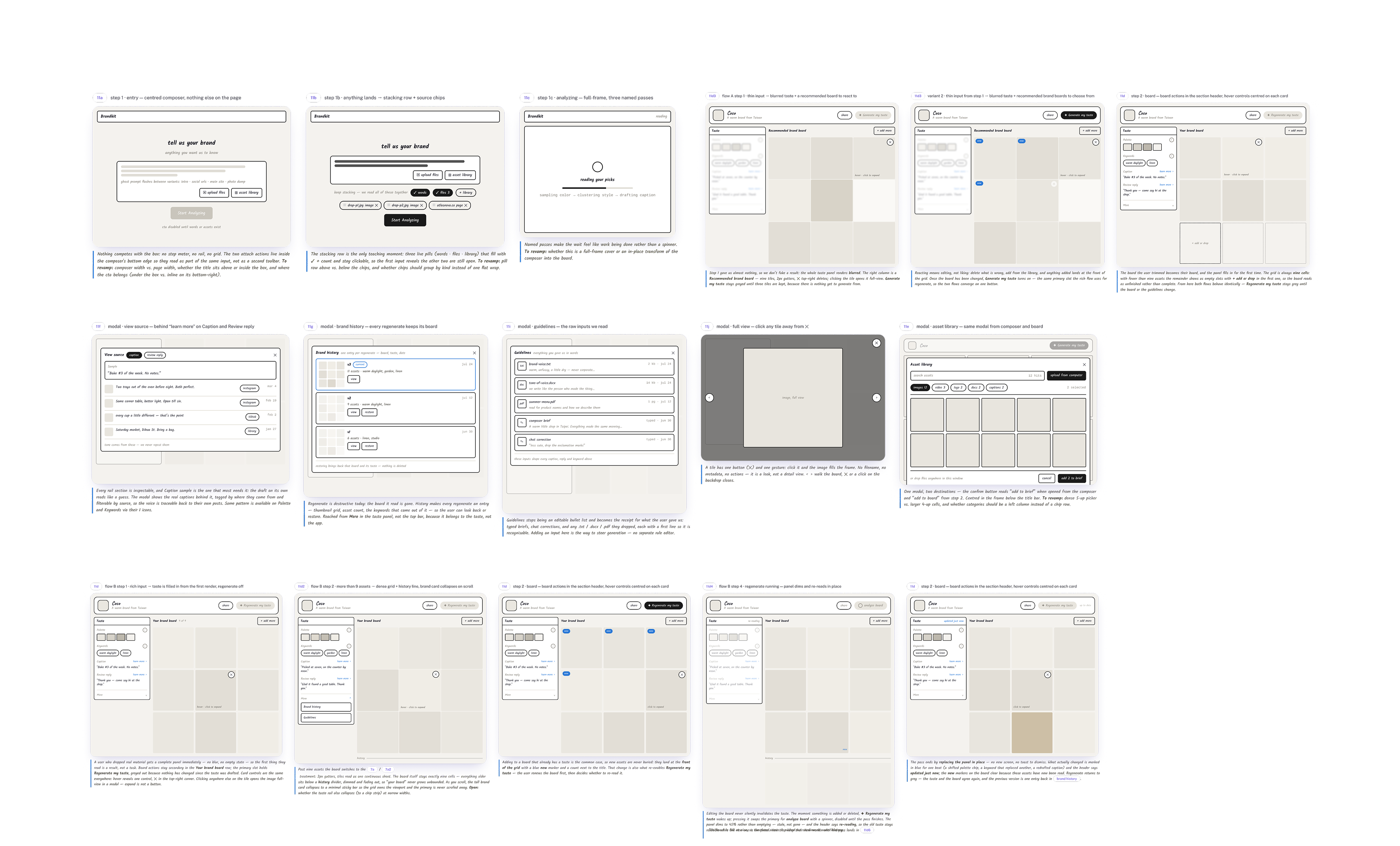
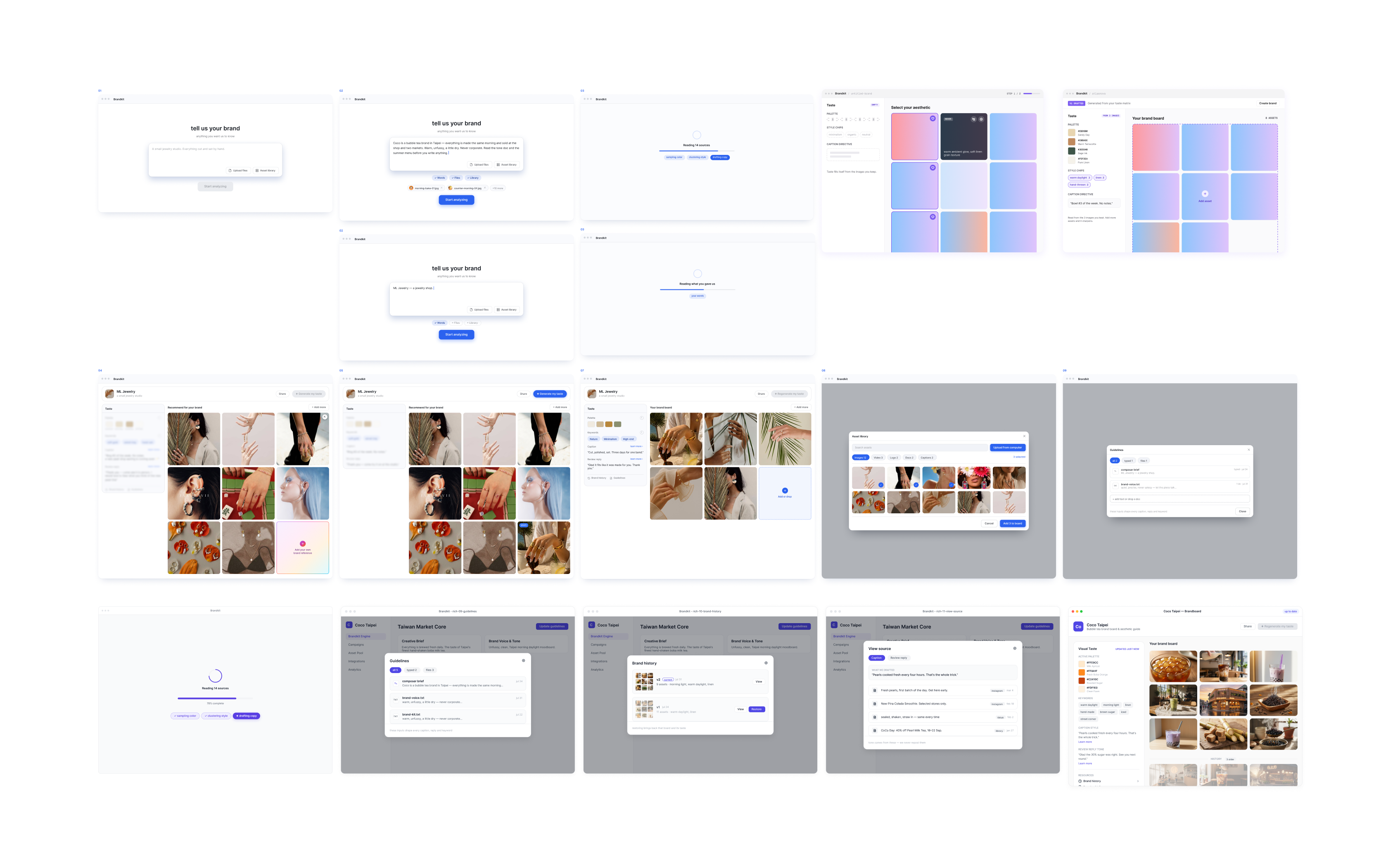
03 — New choices update the profile through rules owners can inspect and correct.
A profile that stays fixed after setup would fall behind the content users actually choose. If every edit rewrote it, users would lose control. By testing agent behavior across different use cases, I defined how user behavior (selected photos and published captions or replies) could inform later guidance, which corrections retain priority, and when a new version should be saved. Each change keeps its source and reason, so Brand Kit can adapt without hiding how its direction changed.
Key Design Decisions
User research revealed how people express and refine their brands; model testing revealed what the system needed to interpret that intent reliably. I brought these findings into the Brand Kit agent’s rules for reading inputs, selecting references, and updating brand context. Together, the research and agent design informed three interface decisions: an adaptable starting point, a visual-first moodboard, and a traceable update loop.
01 — One starting point adapts to different levels of brand readiness
User research showed that some users were still discovering their brand, while others arrived with extensive materials. Model testing added another constraint: limited evidence could produce confident but unsupported brand facts. I translated both findings into agent rules for handling different inputs, identifying missing evidence, and preserving user corrections. This informed one starting point where users could begin with what they had, while the agent handled the materials behind the scenes. Users remained involved in choosing what represented their brand and checking uncertain details.
02 — Make brand direction visible and steerable through a visual-first moodboard
User testing showed that people needed a faster way to judge brand direction than reading a text-heavy profile. Model testing showed that image references guided image generation better than text-only descriptions, with six to nine images working best as a reference set. I translated these findings into agent rules that selected up to nine brand photos within one visual direction and kept additional photos outside the active board. Together, these findings and rules informed a visual-first moodboard at the top of Brand Kit. Users could review and change the references, then regenerate the Taste Panel to inspect the resulting direction, while written brand restrictions and explicit corrections remained in force.
03 — Let brand context evolve without losing user control
Journey mapping showed that brand decisions continued beyond setup, through the photos users selected and the content they published. The agent design defined how these signals could inform later guidance, while preserving explicit corrections and recording each change’s source and reason. Together, these findings informed a traceable update loop: Brand Kit could learn from everyday work, and users could inspect what changed, correct its interpretation, or restore an earlier version. Adaptation became part of the workflow while deliberate brand decisions stayed in the user’s hands.
Evaluation
Prompt and Spec Evaluation: testing what the interface could promise
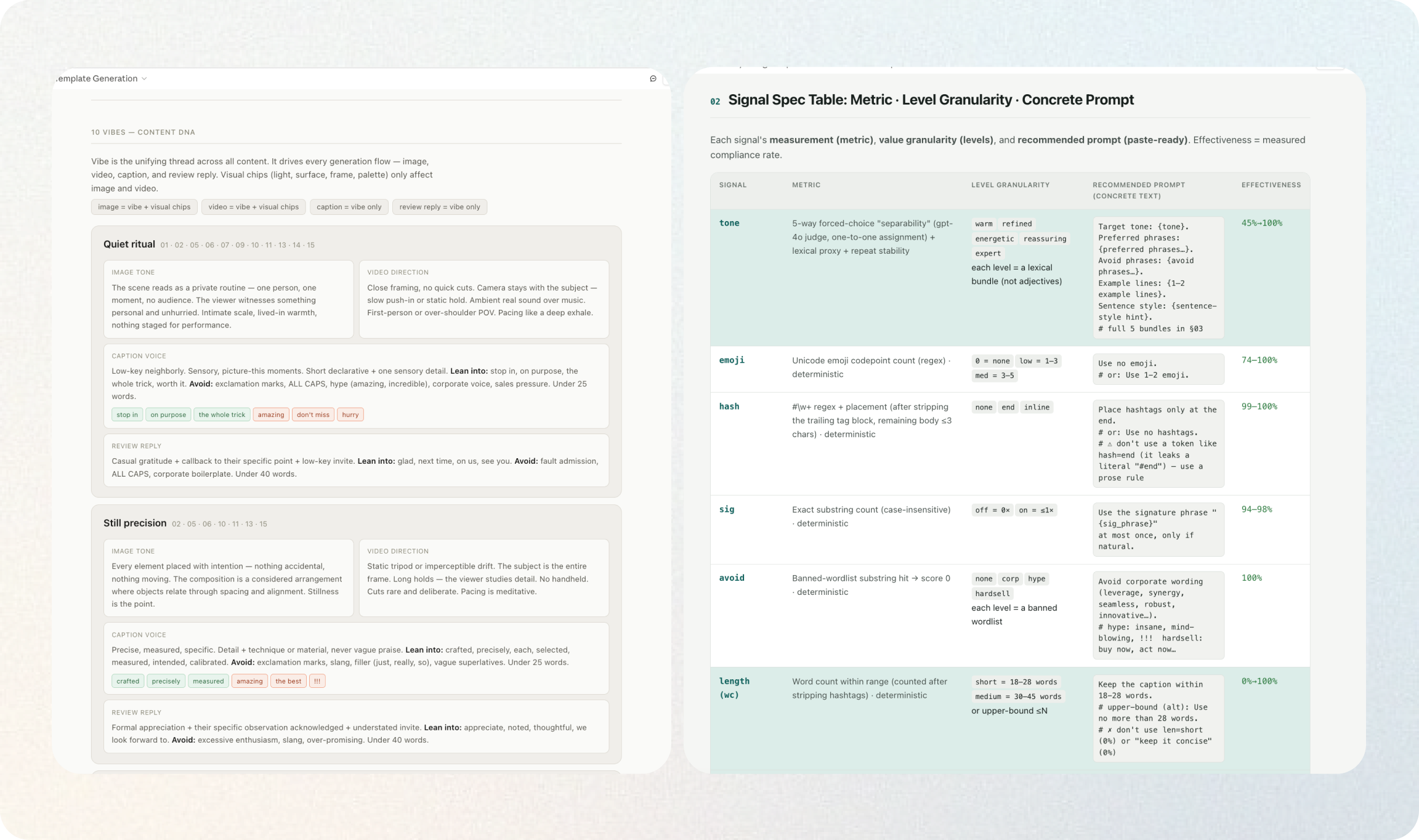
I treated AI model behavior as part of the UX design. For each control, I defined the expected output difference, held other variables constant, generated controlled variants, and compared the results. AI generated the variants and provided a first-pass blind evaluation; I audited the evaluator, reviewed failure patterns, and made the product decisions.
Impact
Impact across user control, model behavior, and system reuse
Brand Kit launched in July. The following outcomes reflect the design’s impact on user control, model behavior and reuse across content creation workflows.
User
- Brand decisions became visible and correctable, with fewer prompt revisions needed to refine each post.
Model
- Controlled evaluation improved refined-tone compliance from 33% to 93%, with 93–98% generation stability in validated tests.
System
- One shared brand context could carry reviewed decisions into campaign generation, captions, and AI review replies.
- 8/10
- Users satisfied with AI-generated content
- User-reported GenAI output quality
- 50%
- Fewer prompt iterations per post
- Before: 6 iterations → After: 3
- 93%
- Refined-tone compliance
- 33% → 93% in controlled evaluation
- 80%
- Brand-system creation satisfaction
- Users satisfied with creating their brand system
- Reusable
- Brand decisions across creation workflows
- Shared context for campaigns, captions, and AI review replies
Takeaways
Design the capability system, not just the model
Designing an AI-native workflow requires understanding two different capability layers: what the model can reliably infer or generate, and what the product can collect, store, verify, control, and recover from. I learned to start with the user’s goal, then decide which parts should be handled by AI, deterministic product logic, or human judgment. The model should expand the workflow, not define its limits. Good AI UX uses AI where it is strong, builds controls and fallbacks where it is weak, and makes those boundaries understandable to users.